Deleting Your Account
You can permanently delete your BrightBlur account, your photos, and your encryption keys from within the app. This page explains how, what gets removed, and how it relates to your rights under UK GDPR.
Deleting your account
Section titled “Deleting your account”- Open Settings and find the Delete account card.
- Tap Delete account… to open the confirmation dialog. BrightBlur loads a summary of exactly what will be affected.
- Read the impact summary, resolve any blockers (see below), then tap Delete my account.
- Type
delete my accountto confirm, then tap Confirm deletion.
Once deletion completes, your session is destroyed and you are returned to the login page. This cannot be undone.
What the dialog tells you first
Section titled “What the dialog tells you first”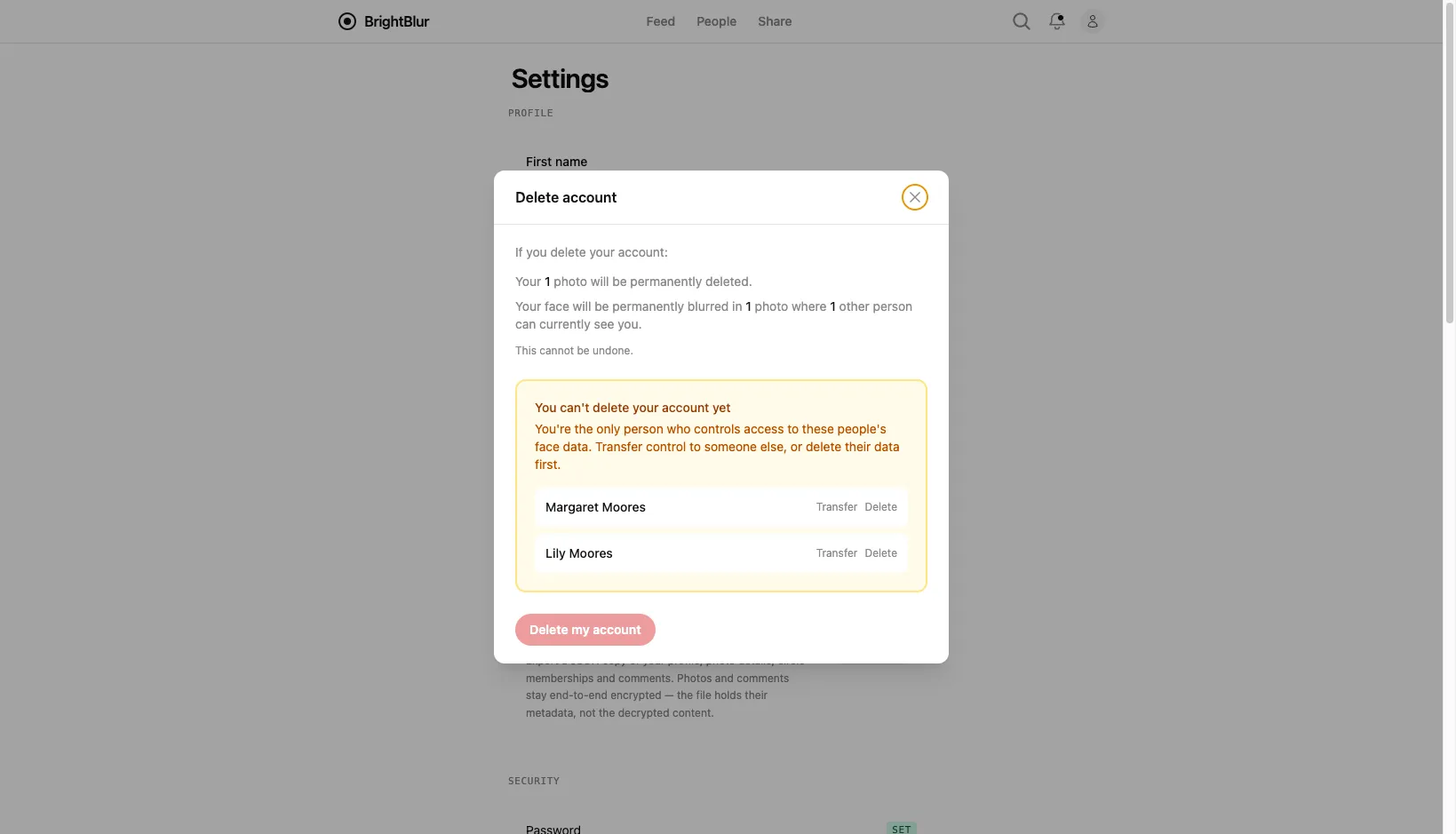
Before you can confirm, the dialog shows the concrete impact of deleting:
- How many photos you uploaded will be permanently deleted.
- How many photos your own face appears in, and how many people can currently see you there — your face becomes permanently pixelated in those photos.
People you are the sole controller of
Section titled “People you are the sole controller of”If you are the only person who controls access to someone’s face data — for example a child whose face data only you manage — you cannot delete your account until that is resolved, because doing so would orphan that person’s data. The dialog lists each affected person and offers two ways forward:
- Transfer control to another member who already has access, who then becomes a controller.
- Delete that person’s data outright.
Once every sole-controlled person has been transferred or deleted, the Delete my account button becomes available.
What deletion removes
Section titled “What deletion removes”Deleting your account removes:
- Every photo you uploaded, including its base image and all face slices.
- Person-groups you solely control (after you have resolved them as above).
- Your comments and your pending access requests.
- Your group memberships, sessions, and encryption keys.
- Your user record.
What is handled differently
Section titled “What is handled differently”- Face fingerprints you contributed to other people’s profiles are anonymised — the link back to you is removed — rather than deleted, so other people’s recognition of their own profiles keeps working.
- Abuse reports you filed and security access logs are retained where we have a legal or safety basis to keep them. See Reporting & Safeguarding.
- Cached photos on other people’s devices cannot be reached. If someone has already viewed and cached a decrypted photo, BrightBlur cannot force that copy to be deleted. This is an inherent limitation of end-to-end encryption.
Note that deletion also wipes the encryption keys cached on your own device. If you had already removed all your passkeys and lost your recovery phrase before deleting, the contents of your own photos may already be beyond recovery — again, an inherent property of end-to-end encryption, not a deletion step.
Your rights under UK GDPR
Section titled “Your rights under UK GDPR”BrightBlur is built to let you exercise your data rights directly:
- Access — you can view all the data associated with your account through the app.
- Erasure — use the deletion features on this page. Controllers can also delete an individual person, which removes all of that person’s face data, fingerprints, and keys in a single operation.
- Withdraw consent — leave any group at any time, or delete a person record to withdraw consent for biometric processing.
- Complaint — you may lodge a complaint with the Information Commissioner’s Office (ICO) at ico.org.uk.
For requests that cannot be handled through the app, contact us at privacy@brightblur.app. The full detail of what we collect and retain is set out in the Privacy Policy.